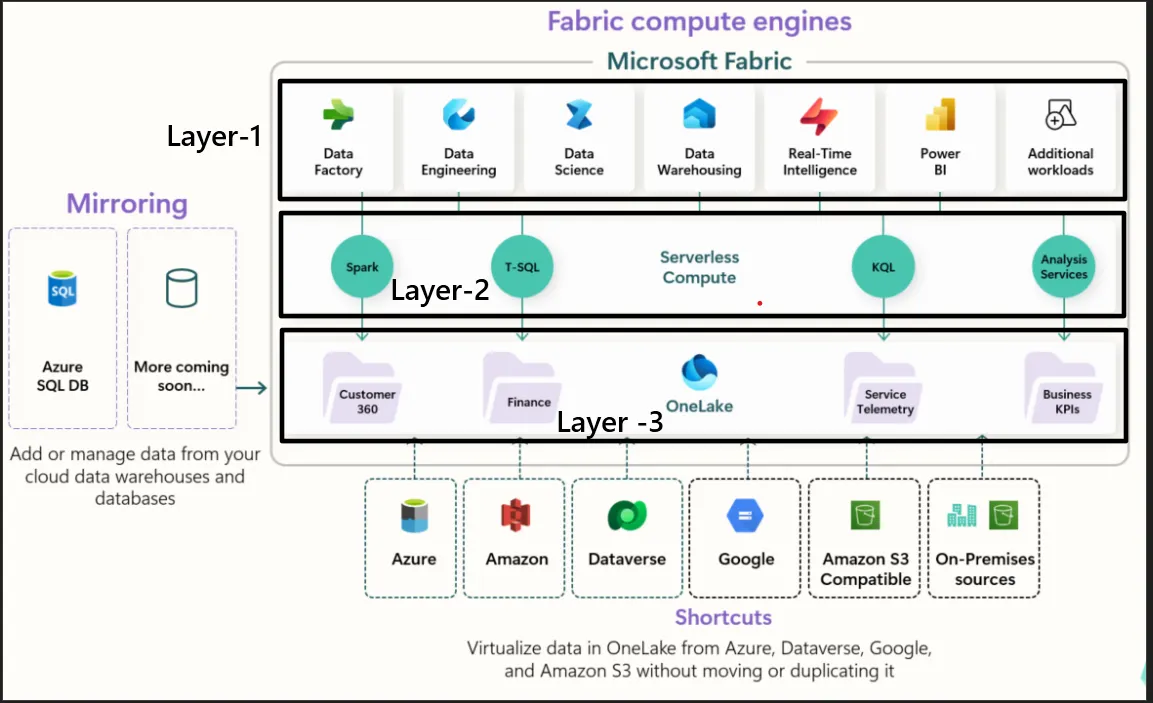
Layer 1 — Workloads (User Interaction Layer) This is the experience layer where different personas interact with data. ✔ What it Includes: Data Factory (ETL / pipelines) Data Engineering (Spark-based transformations) Data Science (ML models, notebooks) Data Warehousing (SQL-based analytics) Power BI (visualization) Real-Time Intelligence (streaming analytics) ✔ Key Concept: 👉 Different tools, same data, no duplication 📌 Example: A healthcare company: Data Engineer cleans patient data using Data Engineering (Spark) Analyst builds dashboards in Power BI Data Scientist trains ML models 👉 All of them work on the same dataset, not separate copies. 🔹 Layer 2 — Compute (Processing Layer) This layer provides different compute engines optimized for different workloads. ✔ Engines in Fabric: Spark → Big data processing (Data Engineering) T-SQL → Warehousing & SQL queries KQL (Kusto Query Language) → Real-time analytics Serverless Compute → On-demand scalable execution ✔ Key Concept: 👉 Choose compute based on use case, not infrastructure 📌 Example: Same retail dataset: Use Spark for large-scale transformations Use SQL for reporting queries Use KQL for real-time clickstream analysis 👉 No need to move data between systems. Become a Medium member Layer 3 — Storage (OneLake — The Foundation) This is the core of Fabric. ✔ What is OneLake? A single unified data lake for the entire organization Built on Delta Lake format Supports shortcuts (no data duplication from external sources) ✔ Key Concept: 👉 Store data once, use everywhere 📌 Example: Instead of: Copying data from Azure → Power BI → Databricks Now: Data is stored once in OneLake All tools directly access it 👉 Eliminates duplication + ensures consistency 🟡 End-to-End Example (Putting All Layers Together) 📌 Use Case: E-commerce Company Storage (Layer 3) Orders data stored in OneLake Compute (Layer 2) Spark cleans & transforms data SQL used for business queries Workloads (Layer 1) Power BI dashboard shows sales trends Data Science predicts customer churn 👉 All running on same data without movement 🟣 Key Takeaways ✅ Fabric eliminates data silos ✅ No more data duplication ✅ Unified platform for all personas ✅ Flexible compute for different workloads ✅ OneLake acts as single source of truth 💡 Final Thought 👉 Traditional approach: Move data to tools 👉 Fabric approach: Bring tools to data
No comments yet.