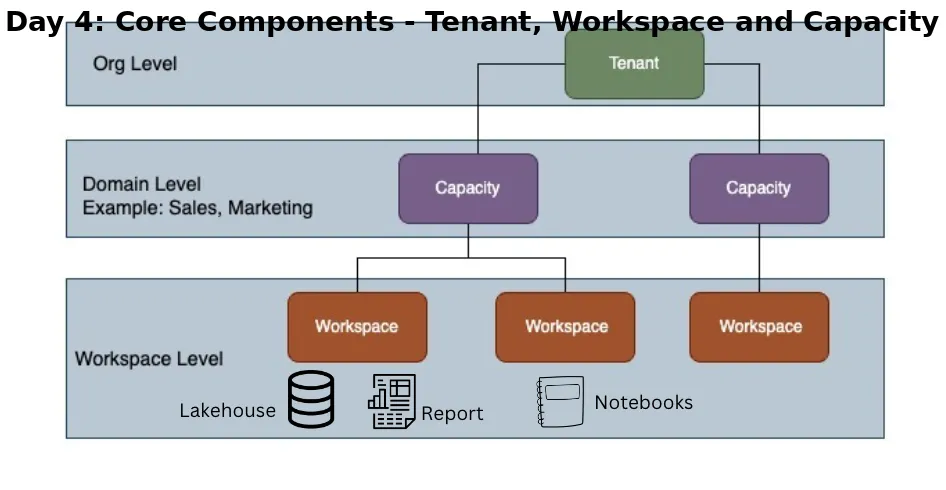
Tenant, Capacity, Workspace 🔴 Problem: Users don’t understand how resources are organized. They create reports, pipelines, and data in random places No clarity on who owns what Performance issues occur because compute is not managed Access control becomes messy 👉 Result: Chaos in data platform + poor governance ✅ Solution in Fabric: Fabric organizes resources into Tenant, Capacity, and Workspace to manage users, workloads, and performance efficiently. 🏢 Tenant represents the organization It is the top-level boundary of Microsoft Fabric Managed using Microsoft Entra ID (Azure AD) Contains all users, permissions, and policies 👉 Example: If you are working in a company like Accenture: All employees login using company credentials All Fabric resources belong to one tenant 👉 Key Role: Security Identity management Organization-wide governance ⚡ Capacity provides compute power Acts as the processing engine of Fabric Provides CPU, memory, and scalability Shared across workloads like: Power BI Data Engineering (Spark) Data Factory pipelines 👉 Example: You refresh a dashboard + run a pipeline + execute a notebook ➡️ All consume same capacity resources 👉 Scenario: Low capacity → slow performance High capacity → faster processing & parallel execution Press enter or click to view image in full size Different types of Capacity are listed out in above image- Write on Medium 👉 Key Role: Performance optimization Workload management Cost vs efficiency balance 📂 Workspace is where projects/resources are created Logical container to organize your work Contains: Reports Lakehouses Pipelines Notebooks 👉 Example: Sales Workspace → sales dashboard + ETL pipeline HR Workspace → employee analytics Finance Workspace → revenue reports 👉 Key Role: Organization of resources Access control (who can view/edit) Collaboration between teams 🔄 How They Work Together (Simple Flow) Tenant → defines organization & users Capacity → processes data & runs workloads Workspace → stores and organizes projects 👉 Example Flow: Data → Stored in OneLake → Processed using Capacity → Used in Workspace (reports/pipelines) 🎯 Key Takeaway: Clear structure helps in better management. Tenant → governance Capacity → performance Workspace → organization 👉 Result: Better control Improved performance Clean and scalable architecture
No comments yet.