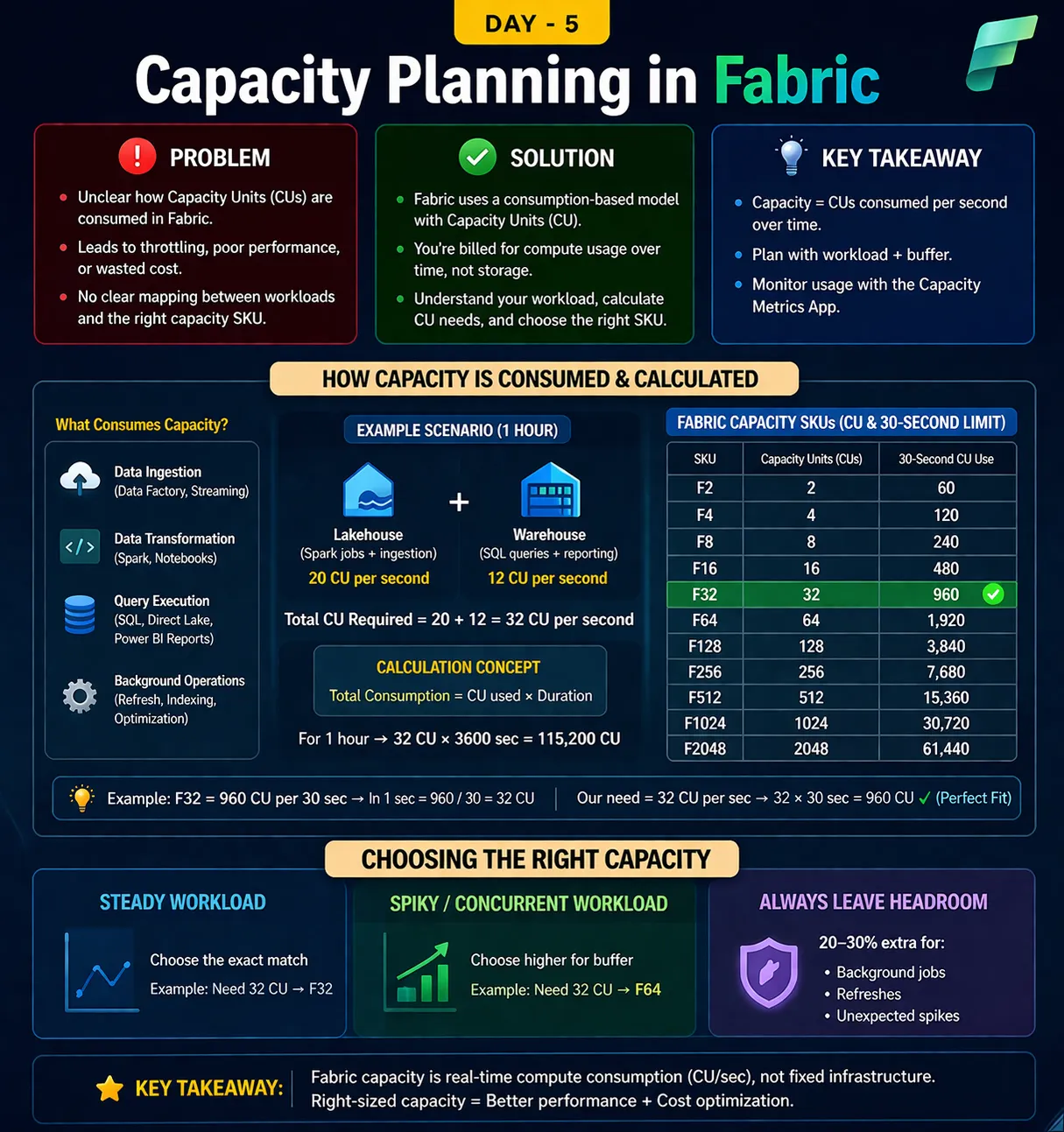
Problem (Deep Understanding) The confusion comes from thinking Fabric = fixed infrastructure, like: VM with CPU cores Dedicated SQL server 👉 But Fabric works on a shared, consumption-based compute model So challenges are: You don’t see CPUs directly, you see Capacity Units (CU) Multiple workloads run together: Lakehouse (Spark) Warehouse (SQL) Power BI All of them compete for the same capacity pool 👉 Result: If demand > capacity → Throttling If capacity > demand → Wasted cost 🟢 Solution (Core Concept) 1. What is CU (Capacity Unit)? CU represents compute power per second Think of it as: “How much processing Fabric can do per second” 2. How Consumption Actually Works 👉 Fabric measures usage as: CU consumption over time Instead of saying: “This query used 4 CPUs” Fabric says: “This workload consumed 20 CU for 10 seconds” 3. Core Formula (Interpretation) Total Consumption = CU × Time Example: 32 CU running for 1 hour = 32 × 3600 = 115,200 CU consumed 👉 Billing + throttling decisions are based on this behavior 📊 Example Scenario (Very Important) Given: Lakehouse workload → 20 CU/sec Warehouse workload → 12 CU/sec 👉 Combined: Total = 32 CU/sec What does this mean practically? Every second: Fabric needs to supply 32 units of compute If capacity cannot supply → delay / throttling 🔢 Mapping with SKU (Critical Insight) Your SKU defines maximum CU available per second Write on Medium SKUCU/secF1616 CUF3232 CUF6464 CU Case Analysis: ❌ F16 Capacity = 16 CU Required = 32 CU 👉 Shortfall → 50% deficit 👉 Result → Throttling + slow queries ✅ F32 Capacity = 32 CU Required = 32 CU 👉 Exact match 👉 Works fine only if workload is stable ✅ F64 Capacity = 64 CU 👉 Extra buffer available 👉 Handles: Sudden spikes Parallel queries Background refresh ⏱️ 30-Second Rule (Most Important Concept) Fabric evaluates capacity in 30-second windows Example: F32 → 960 CU per 30 sec Your usage: 32 CU × 30 sec = 960 CU 👉 Perfect alignment → No throttling If exceeded: Example: You suddenly use 50 CU/sec In 30 sec → 1500 CU But F32 limit = 960 👉 Result: Fabric queues / slows down workloads 🎯 Capacity Selection Strategy (Real-World Logic) Step 1: Identify Workloads Lakehouse (Spark jobs) Warehouse (queries) Power BI (reports) Step 2: Estimate CU per workload Example: Spark job → 20 CU SQL queries → 12 CU Step 3: Add them Total = 32 CU Step 4: Add buffer (VERY IMPORTANT) +20–30% headroom 👉 32 × 1.3 ≈ 42 CU Step 5: Choose SKU F32 → borderline ⚠️ F64 → safe ✅ 🔵 Key Takeaway (Expert-Level Understanding) Fabric is not resource-based (CPU/RAM) It is throughput-based (CU/sec) 👉 Golden Rule: Always size capacity based on peak concurrent workload, not average 💡 One-Liner to Teach Students “Fabric capacity planning is about ensuring your CU/sec supply always meets or exceeds your workload demand — especially during peak load.”
No comments yet.