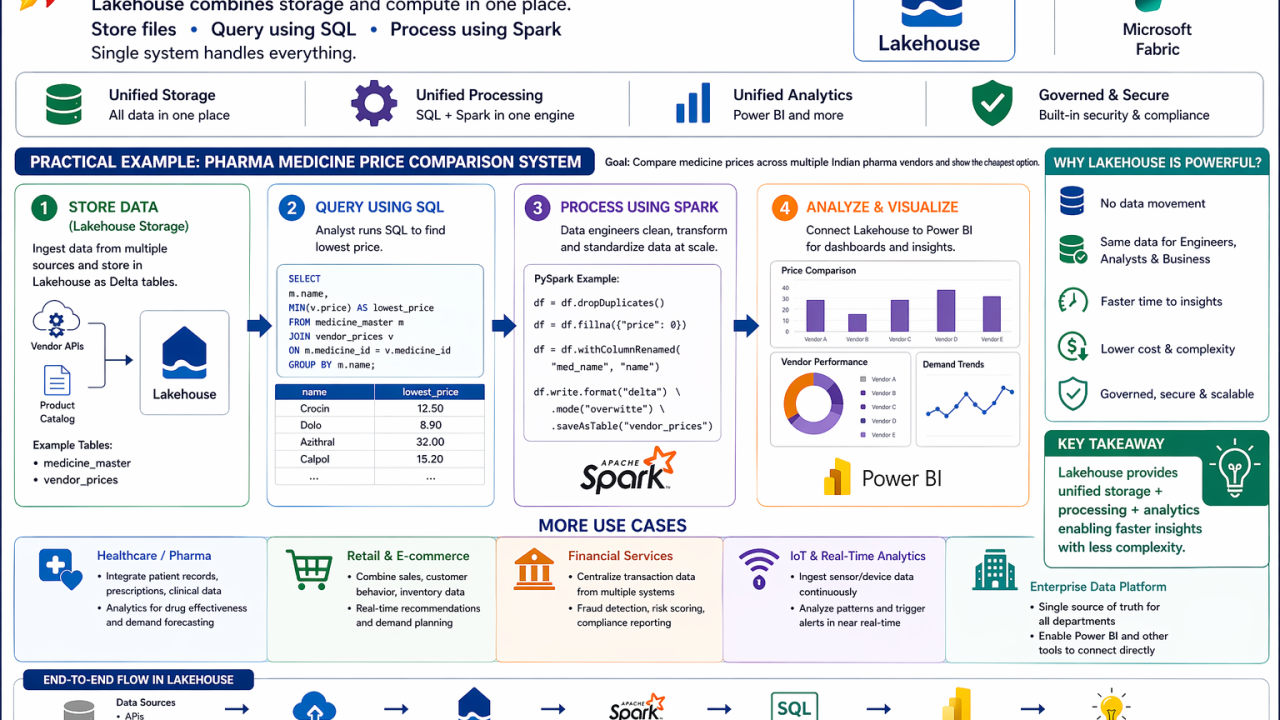
Modern data systems often break because storage, processing, and analytics are separated. Lakehouse in Microsoft Fabric eliminates that fragmentation. 🔹 What is a Lakehouse? A Lakehouse is a unified platform where you can: Store data Query using SQL Process using Spark 👉 No separate systems. Everything runs in one place. 🔹 Practical Example: Pharma Medicine Price Comparison System Let’s take a real-world scenario aligned with your domain 👇 You want to build a platform where users can search medicines and compare prices across multiple Indian pharma vendors. 🧩 Step 1: Store Data (Lakehouse Storage) Data sources: Vendor APIs (e.g., medicine prices from different companies) Product catalog (medicine name, composition) Store in Lakehouse as Parquet/Delta tables 👉 Example: medicine_master (medicine_id, name, category) vendor_prices (vendor_id, medicine_id, price, availability) 🔍 Step 2: Query using SQL Analyst or app queries lowest price 👉 Example SQL: SELECT m.name, MIN(v.price) AS lowest_price FROM medicine_master m JOIN vendor_prices v ON m.medicine_id = v.medicine_id GROUP BY m.name; 👉 Output: User sees cheapest available medicine across vendors ⚙️ Step 3: Process using Spark (Data Engineering) Clean and standardize vendor data Handle missing prices Normalize medicine names 👉 Example (PySpark): df = df.dropDuplicates() df = df.fillna({"price": 0}) 📊 Step 4: Power BI Integration Build dashboard: Price comparison Vendor performance Demand trends 🔹 What makes Lakehouse powerful here? No ETL movement between systems Same data used by: Engineers (Spark) Analysts (SQL) Business (Power BI) 🔹 More Quick Examples 🛒 Retail Store: Sales + customer data Query: Top-selling products Process: Customer segmentation 🏦 Finance Store: Transactions Query: Fraud patterns Process: Risk scoring models 📡 IoT Store: Sensor data Query: Device status Process: Real-time anomaly detection 💡 Key Takeaway: Lakehouse enables one system to handle ingestion → transformation → analytics → visualization
No comments yet.