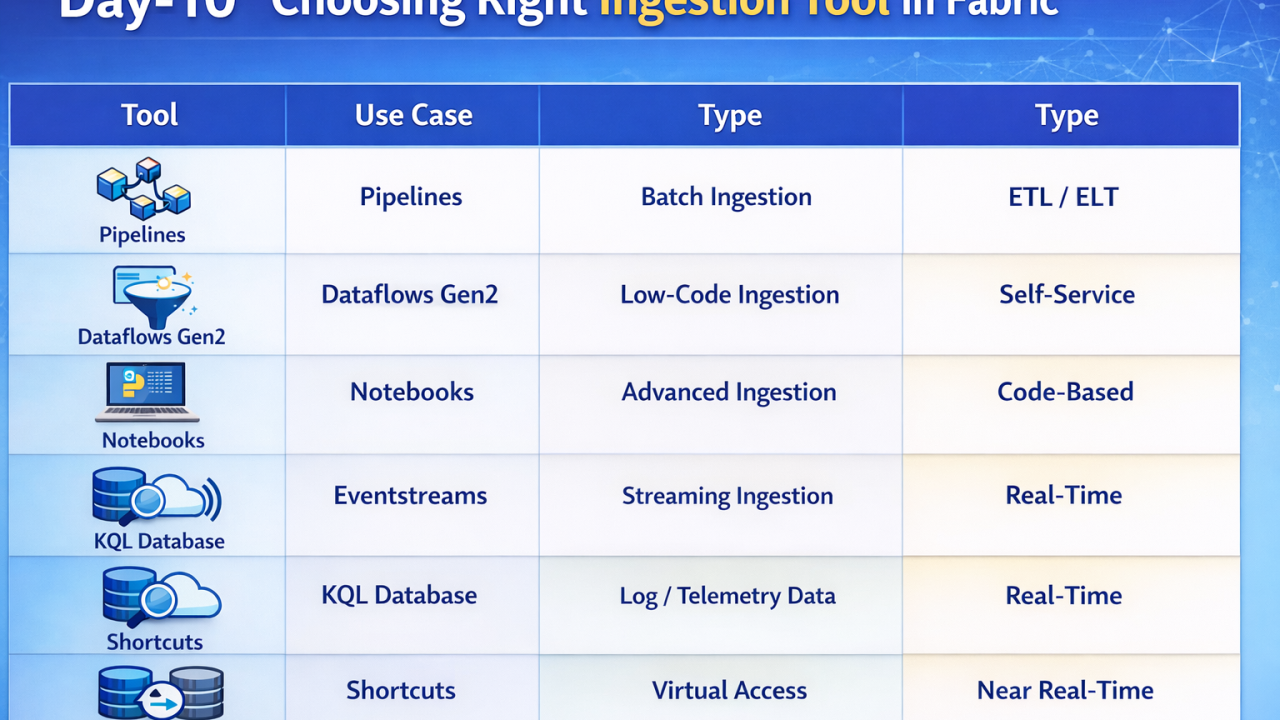
Overview In Microsoft Fabric, data ingestion is not handled by a single tool. Instead, Fabric provides multiple specialized ingestion tools, each designed for different scenarios like batch, real-time, or low-code ingestion. 👉 Choosing the right tool depends on: Type of data (batch vs streaming) Source system Complexity of transformation 🔷 1. Data Factory Pipelines Best for: Batch ingestion & orchestration Used to move data from multiple sources into Fabric Supports connectors like SQL, APIs, files, SaaS apps Provides Copy Activity for data transfer Enables scheduling and automation 👉 Think of it as the core ETL/ELT engine 🔷 2. Dataflows Gen2 Best for: Low-code data ingestion & transformation Power Query-based ingestion (same as Power BI) Ideal for business users / analysts Perform transformations while ingesting data Load directly into Lakehouse or Warehouse 👉 Best when you want UI-driven data preparation 🔷 3. Notebooks (PySpark) Best for: Advanced & large-scale ingestion Use Python / PySpark for custom ingestion logic Handle big data, complex transformations, APIs Directly write into Lakehouse (Delta tables) 👉 Best for data engineers needing flexibility 🔷 4. Eventstreams Best for: Real-time data ingestion Capture streaming data from: IoT devices Logs Event hubs Process and route data in real-time 👉 Enables real-time analytics scenarios 🔷 5. KQL Database (Real-Time Analytics) Best for: High-speed streaming ingestion Uses Kusto Query Language engine Ingests large volumes of telemetry/log data Works seamlessly with Eventstreams 👉 Ideal for monitoring, analytics, and time-series data 🔷 6. Shortcuts (OneLake) Best for: Virtual ingestion (no data movement) Create shortcuts to external data (ADLS, S3, etc.) No physical copy of data Access data in-place 👉 Saves cost and avoids duplication 🔷 7. Mirroring (Database Replication) Best for: Near real-time ingestion from operational systems Continuously replicates data from: Azure SQL DB Databases Keeps Fabric in sync with source 👉 Useful for real-time reporting without ETL [Fabric Architecture, microsoft fabric, microsoft learn, azure, DP600,DP700]
No comments yet.